Jupyter Projspec: Bringing Project Discovery to JupyterLab
What is Jupyter Projspec?
Have you ever opened a directory in JupyterLab and wondered — what kind of project is this? Is it a Python package? A data pipeline? A machine learning experiment? What can I do with it?
Jupyter Projspec is a JupyterLab extension that answers these questions automatically. It scans your working directory using projspec — a project discovery library by Martin Durant — and presents a structured view of what’s inside: the project type, its contents, specifications, and available build artifacts.
Think of it as an intelligent project inspector for JupyterLab.
Featured on Anaconda’s Podcast
Today, jupyter-projspec was featured on Anaconda’s Numerically Speaking podcast! The segment starts around the 24:46 mark.
Why Build This?
When you work with data and code every day, you encounter many different project layouts — pyproject.toml-based Python packages, conda recipes, Zarr stores, HuggingFace datasets, and more. Each has its own conventions, its own set of files to look at, and its own actions you might want to take.
Projspec, created by Martin Durant as part of the fsspec ecosystem, provides a unified way to detect and describe these project types. It can look at a directory and tell you: this is a Python package with these entry points, or this is a Zarr dataset with these arrays, or this is a conda recipe that can be built into a package.
The missing piece was surfacing this information where people actually work — inside JupyterLab. That’s what jupyter-projspec does.
How It Works
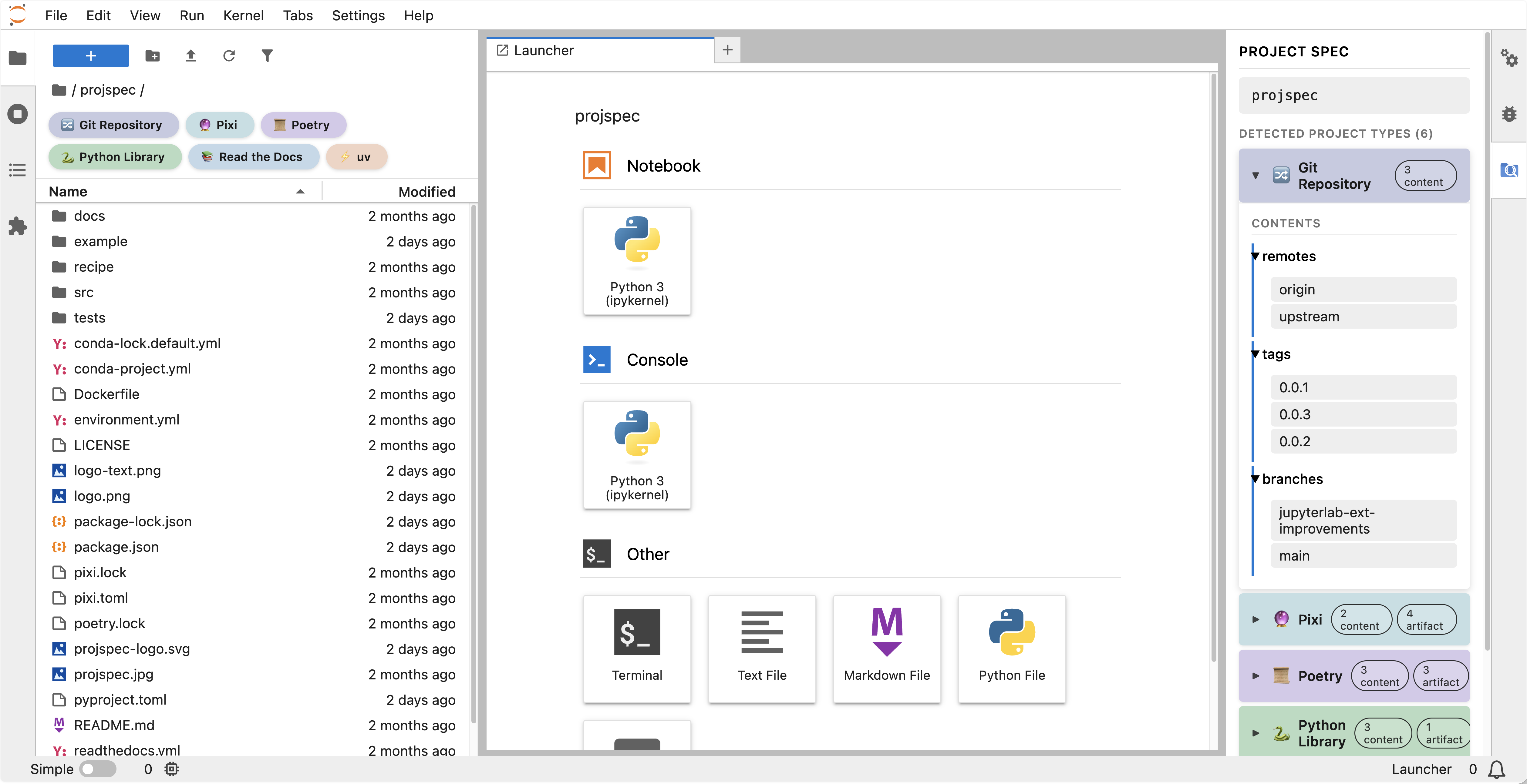
The extension adds two UI elements to JupyterLab: a sidebar panel that displays project information in a collapsible tree view, and colored badge chips in the file browser that show detected project types at a glance. When you navigate to a directory, it calls the projspec Python backend to scan and identify what’s there, then renders the results.
Projspec’s Three Concepts
To understand what the extension shows, it helps to know projspec’s model. From projspec’s perspective, every project directory has three layers:
- Specs – the project types detected (e.g.,
PythonLibrary,GitRepo,Pixi). A single directory can match multiple specs simultaneously – a typical project might be a Git repo, a Python library, and a Pixi workspace all at once. - Contents – read-only metadata describing what’s in the project: environment specs (pip/conda/npm), package info, licenses, commands, and descriptive metadata. Contents tell you what is here.
- Artifacts – actions the project can perform: building wheels, creating conda packages, generating lock files, spinning up Docker containers, running servers. Artifacts tell you what you can do.
Projspec currently recognizes 23+ project types out of the box, covering the Python ecosystem (pyproject.toml libraries, Poetry, uv, Pixi, conda recipes), JavaScript (Node, Yarn, JupyterLab extensions), Rust (Cargo), web frameworks (Django, Streamlit, PyScript), documentation (mdBook, ReadTheDocs), data projects (Frictionless Data Packages, HuggingFace repos), IDEs (VS Code, JetBrains, Zed), and more. Detection is plugin-based – each project type registers itself and provides a fast match() method that checks for marker files (like pyproject.toml, Cargo.toml, or pixi.toml).
The Architecture
Under the hood, the extension has two layers:
Server extension (Python, Tornado): Exposes a REST endpoint at GET /jupyter-projspec/scan. It takes a directory path, validates it to prevent directory traversal, calls projspec.Project(path).to_dict(), and returns the full project tree as JSON.
Frontend extension (TypeScript, React): Two widgets subscribe to JupyterLab’s fileBrowser.model.pathChanged signal, so they update automatically when you navigate directories. The sidebar panel renders each detected spec as a collapsible section with nested views for contents and artifacts. The chips widget injects colored badges below the file browser breadcrumbs – each chip is labeled with the spec name (like “Python Library” or “Git Repo”) and clicking one scrolls to and expands that spec in the sidebar. Both widgets debounce their API calls and use AbortController to cancel in-flight requests when the path changes rapidly.
Building It: A Collaborative Effort
This extension came together through a collaboration that I’m really proud of.
Martin Durant is the author of projspec (and fsspec, kerchunk, Intake, and many other foundational Python data tools). He built the discovery engine that makes this possible — the ability to look at any directory and understand what kind of project it is. Working closely with Martin meant we could iterate quickly on what the extension should expose and how the Python API should evolve to support the JupyterLab use case.
Rosio Reyes, my colleague on the OSS-Jupyter team at Anaconda, contributed to the frontend development and UX design. Rosio also works on jupyter-fsspec, the JupyterLab extension for browsing remote filesystems — so there’s a natural connection between browsing files (jupyter-fsspec) and understanding what those files represent (jupyter-projspec).
What’s Next
The current release handles project scanning, the sidebar tree view, and file browser chips. Here’s where we’re heading next:
- Artifact actions – not just showing what can be built, but letting you trigger builds directly from the UI with Make buttons (e.g., “build this conda package” or “generate a lock file”). This is actively in development on a PR branch, with server-side command resolution through projspec, concurrency limits, and output capture already working.
- Remote filesystem support – leveraging fsspec to scan projects on S3, GCS, or any other supported backend, with a natural bridge to jupyter-fsspec for browsing those remote files
- More project types in projspec – expanding detection to cover data formats like Zarr, OME-NGFF, and STAC catalogs, alongside the existing HuggingFace and Frictionless Data support
Try It Out
The extension is open source and available on GitHub:
- jupyter-projspec: github.com/fsspec/jupyter-projspec
- projspec (the underlying library): github.com/fsspec/projspec
- projspec docs: projspec.readthedocs.io
Install it with pip:
pip install jupyter-projspec
This pulls in projspec as a dependency. After installation, restart JupyterLab and you’ll see the Projspec panel in the right sidebar.
If you’re interested in project discovery for Jupyter, we’d love your feedback. Open an issue, try it on your own projects, or come say hi in the Jupyter community channels.
I’m a Senior Software Engineer on the OSS-Jupyter team at Anaconda, where I work on JupyterLab core contributions, extensions, and community tools. You can find more of my work at labextensions.dev and follow my conference talks and open source adventures on this blog.
Jupyter Newsletter
Get detailed extension reviews and updates on the Jupyter ecosystem.
After signing up, Buttondown may send a confirmation email to verify your address.
