700 JupyterLab 4 Extensions!

The JupyterLab extension ecosystem just crossed 700 extensions compatible with JupyterLab 4!
That’s 700 community-built plugins — from astronomical data viewers to reactive notebook editors, from genome browsers to workflow managers — created by hundreds of developers, research labs, and companies around the world.
What Are JupyterLab Extensions?
Extensions are how JupyterLab becomes a Git client, a dashboard builder, a genomics viewer, or an AI workspace — without changing the core application. Install one with pip install, and it activates automatically.
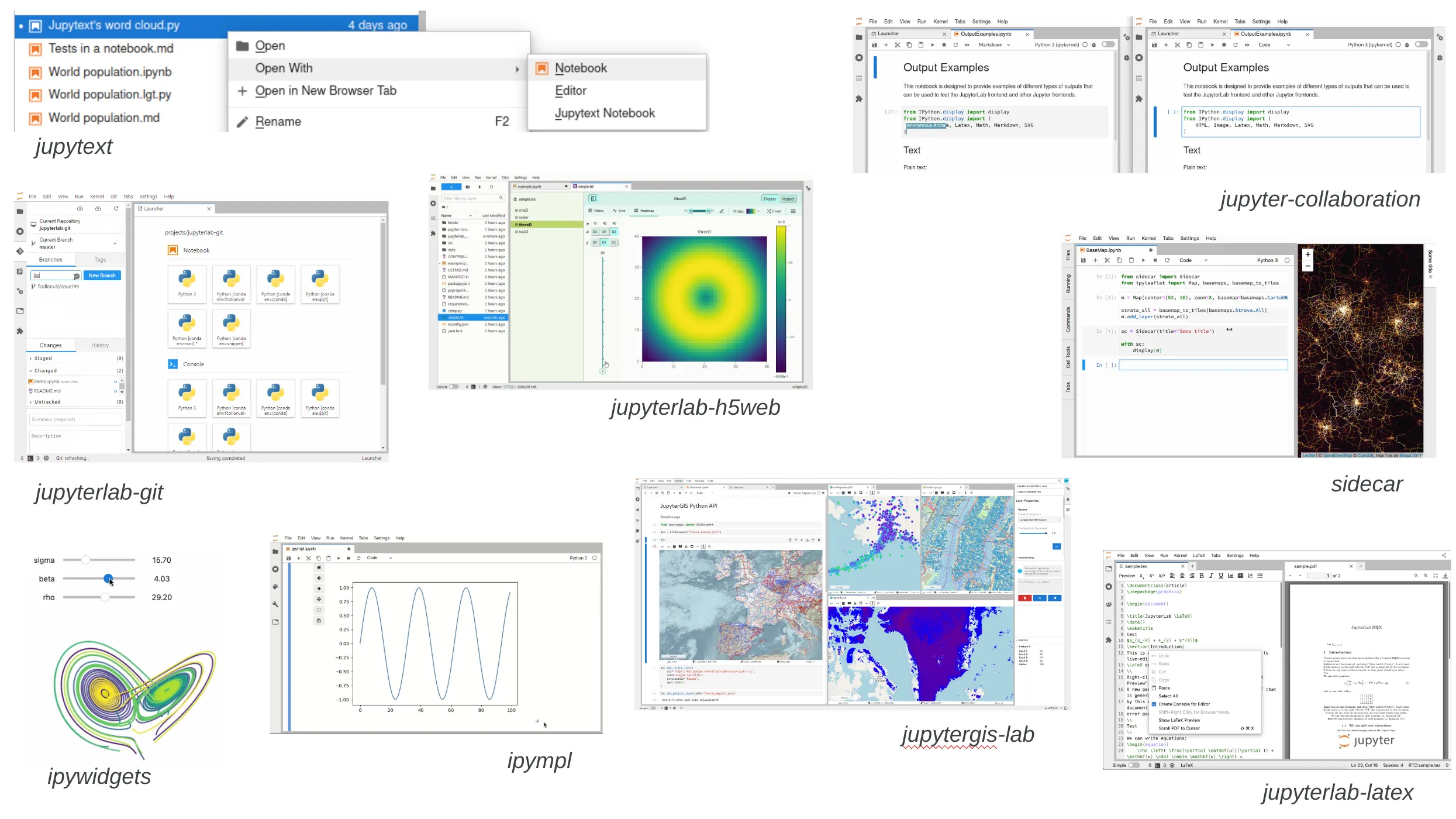
This is by design: JupyterLab itself is built as a collection of extensions — the file browser, the notebook editor, the terminal are all plugins. The same architecture that powers the core lets the community build what they need. For background, see 99 ways to extend the Jupyter ecosystem.
The Ecosystem at 700
- 700+ extensions compatible with JupyterLab 4
- ~960 total extensions published on PyPI
- ~9.8 million downloads/month
- 100M+ total downloads in the past year
By any measure, a substantial software layer has grown around JupyterLab.
How We Got Here
The ecosystem crossed 600 JL4-compatible extensions in late October 2025, days before JupyterCon in San Diego. At the conference, we ran a full-day Extension Development for Everyone tutorial with hands-on rapid prototyping. By early March 2026, we hit 700.
The ecosystem has been growing at a steady pace, averaging about 18 new extensions per month, with November 2025 setting an all-time monthly record of 33. Modern tooling is helping: better templates, documentation, and code generation tools have lowered the bar for what once required deep familiarity with TypeScript, Lumino, and JupyterLab internals.
Where the Extensions Are
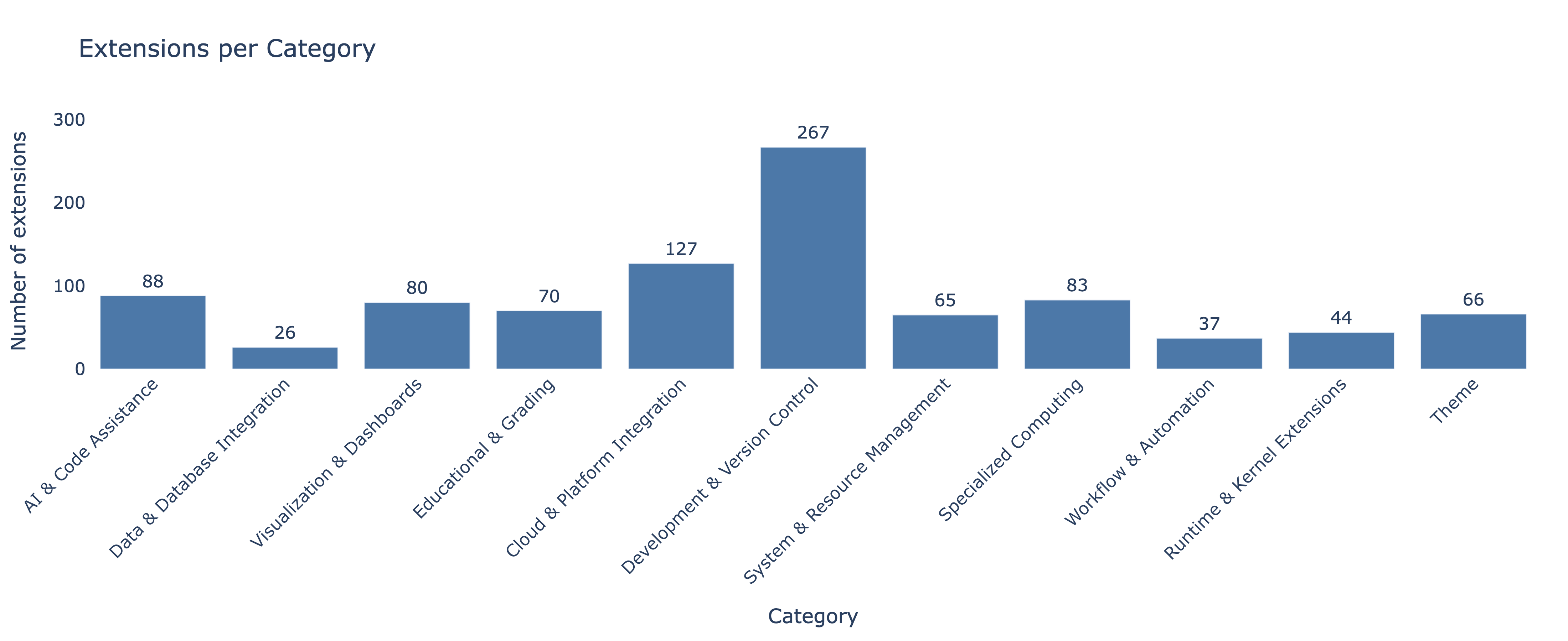
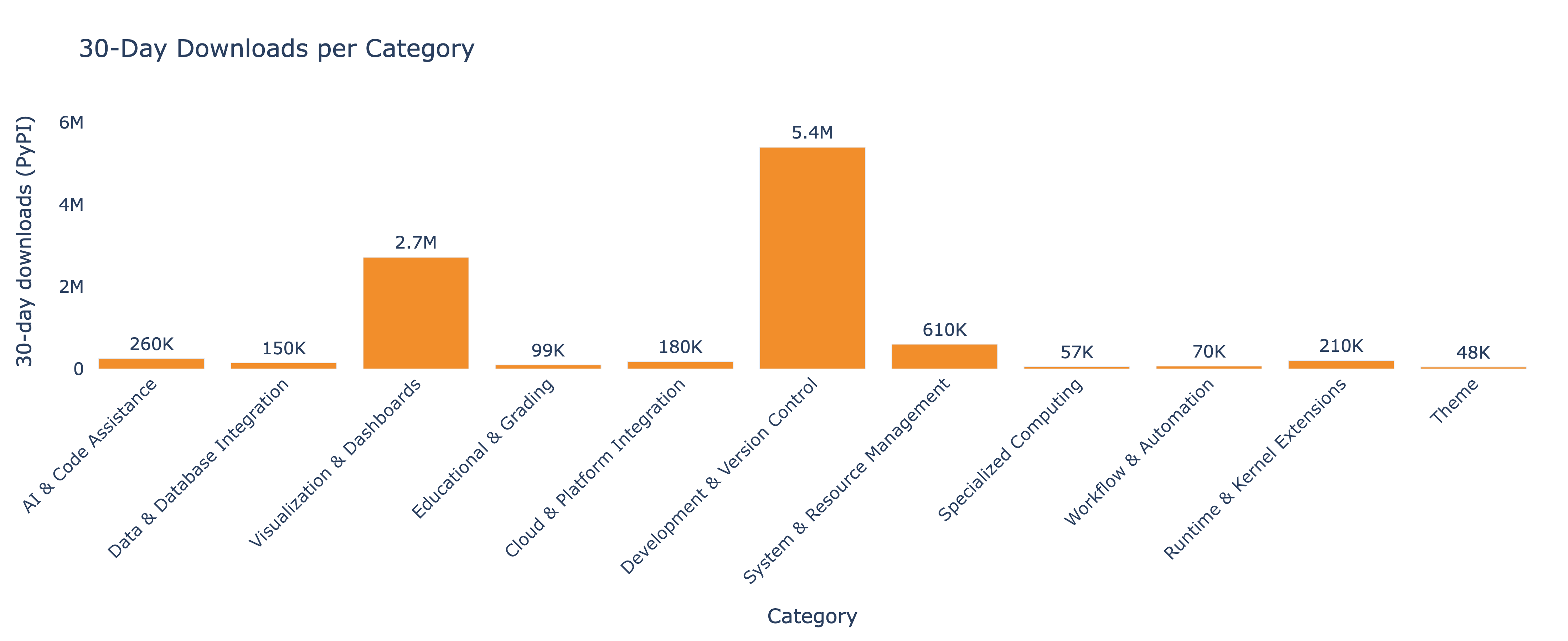
Development & Version Control dominates both in count (267) and downloads (5.4M/month). Visualization & Dashboards (2.7M/month) and System & Resource Management (602K/month) round out the top three most downloaded categories. But the fastest-growing categories point to where things are heading. Here’s what’s new in 2026:
JupyterLab’s AI Layer Starts Taking Shape
AI isn’t yet the biggest category in JupyterLab, but it may be the clearest signal of where new interaction patterns are emerging:
- jupyter-ai-acp-client — Brings external AI agents into JupyterLab’s chat via the Agent Communication Protocol. Ships with Claude Code and Kiro personas.
- nb-margin — Annotate cells with margin comments, and Claude Code edits them. A different paradigm from chat-based AI.
- jupyterlite-ai-kernels — AI-powered kernels for JupyterLite, from Jeremy Tuloup. AI-assisted computation entirely in the browser.
- jupyter-chat-components — Reusable chat UI components from Project Jupyter — building blocks for the next generation of AI tools.
These extensions reflect what the JupyterLab team identified as a 2026 priority: first-class integration with AI tooling.
Reproducibility Gets a Toolchain
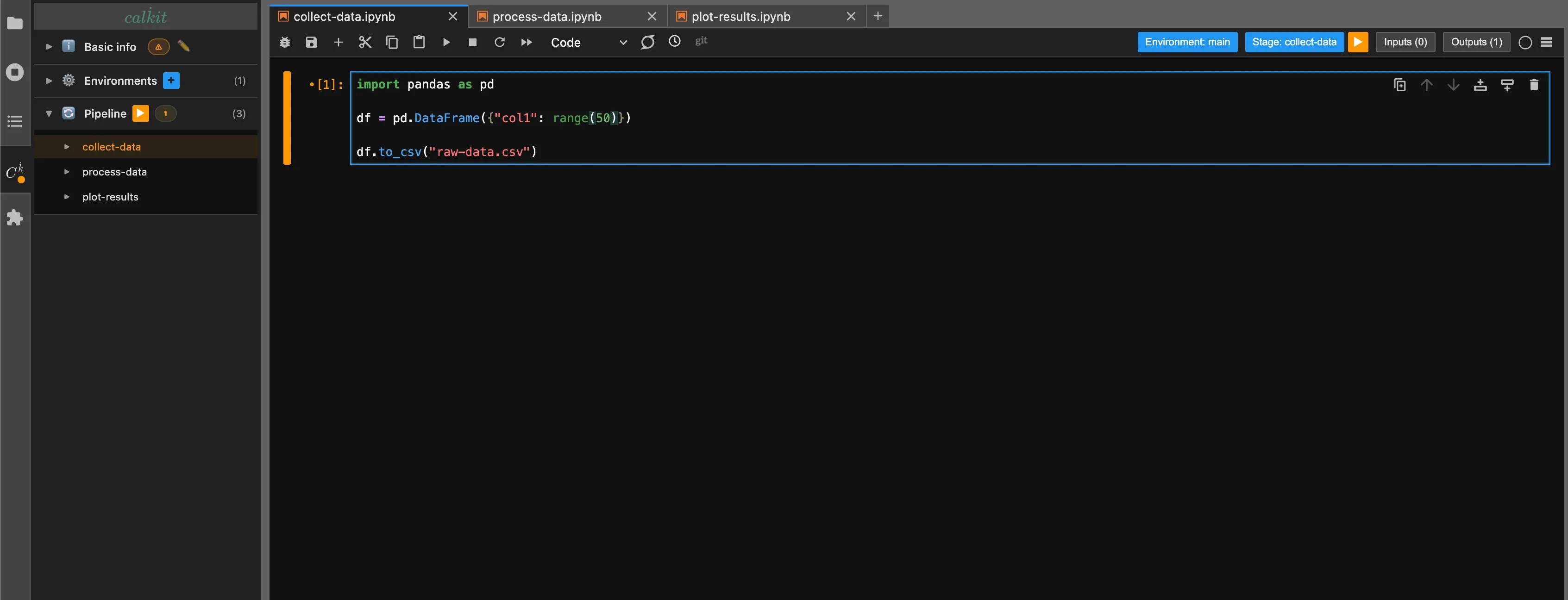
calkit-python is the most downloaded new extension of 2026 (11,000+ monthly downloads). It gives notebooks project-scoped environments, graphical package management via Astral’s uv, and one-click notebook pipelines with freshness tracking. Think “Makefiles for notebooks” meets “Poetry for Jupyter.”
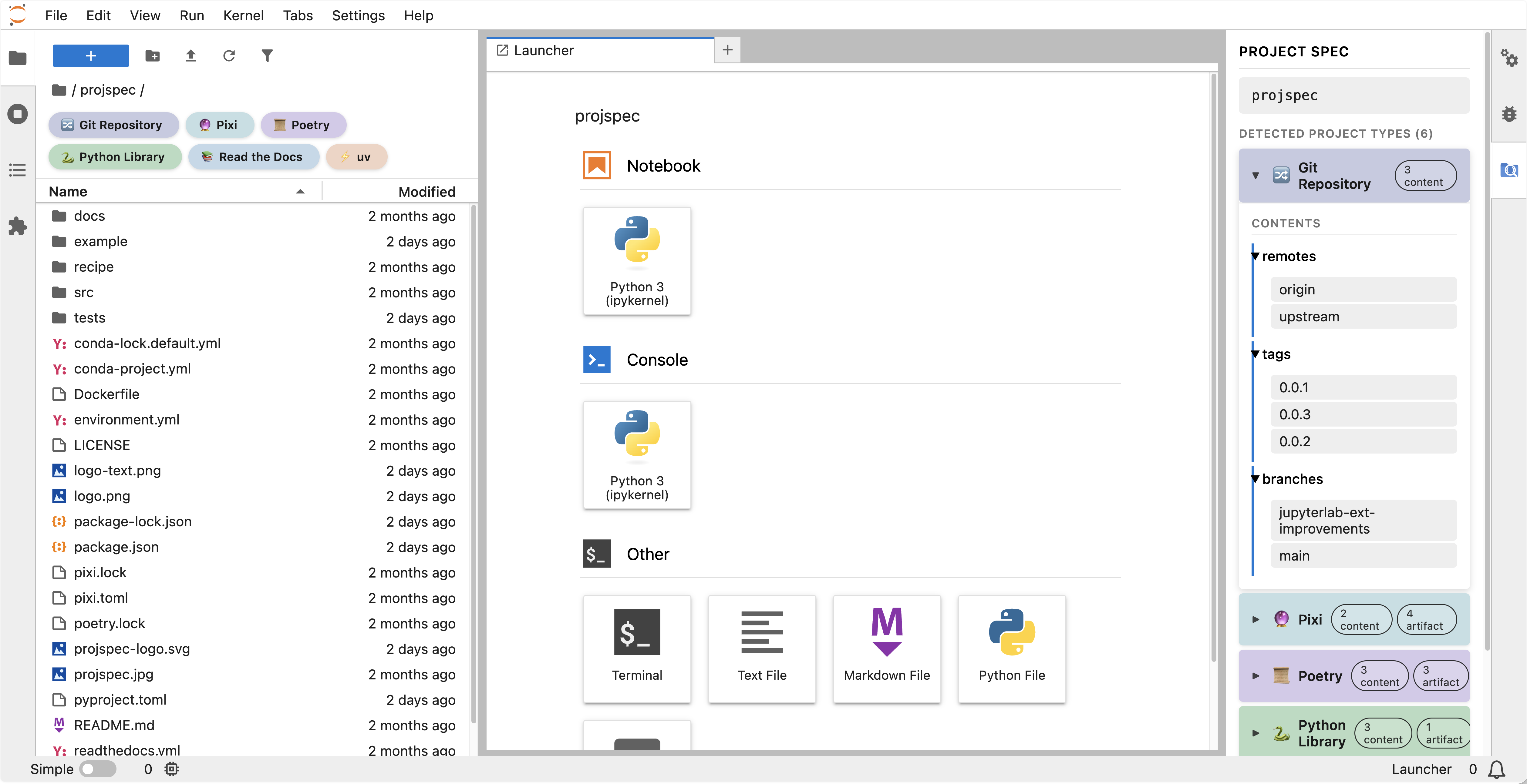
jupyter-projspec (from the fsspec contributors) takes a complementary approach — it brings projspec into JupyterLab, letting you scan and analyze project structures directly from the notebook environment.
Marimo Comes to JupyterLab
Marimo — the reactive notebook editor — now runs inside JupyterLab. The official marimo-jupyter-extension from the Marimo team lets you open and edit _mo.py Marimo files directly in JupyterLab, bringing reactive execution to JupyterHub deployments without leaving the Jupyter environment. This matters for teams that want to adopt Marimo incrementally — you can keep your JupyterHub infrastructure and add Marimo as another file type alongside traditional notebooks.
Science
- fitsview — Stream FITS astronomical data slices directly in JupyterLab without downloading full files.
- jupyterlab-urdf-test — 3D robot model viewer/editor (URDF + Three.js), from jupyter-robotics.
- climb-jupyter-igv — Integrative Genomics Viewer with S3 access for bioinformatics.
- ggblab — GeoGebra interactive geometry with bidirectional Python communication. Second most downloaded new extension of 2026.
Accessibility
Accessibility has been a growing focus for JupyterLab core and extensions are starting to address it too:
- jupyterlab-a11y-checker — From UC Berkeley’s DSEP infrastructure team, this extension scans notebooks for WCAG 2.1 AA issues: missing alt text, heading structure, table headers, color contrast, and link text. Guided fix interfaces, optional AI suggestions, and a CLI for CI pipelines. Over 11,000 total downloads and a documentation site.
- jupyterlab-change-ui-font-size-fix — Fixes file browser icon misalignment when users change the UI font size — a small but real pain point for anyone who needs larger text.
27 Extensions, One Platform
Stellars is a JupyterLab-based data science platform — GPU support, MLflow, TensorBoard, Optuna — assembled from 27 custom extensions covering everything from branding and file icons to kernel management and diagram rendering, VS Code file icons, trash management, Mermaid-to-PNG conversion, and more. JupyterLab is now flexible enough that one developer can assemble a domain-specific product entirely from extension building blocks.
Want to Build Your Own?
The JupyterCon tutorial is fully available: step-by-step materials and the complete YouTube recording. It covers scaffolding, plugin architecture, publishing to PyPI, and rapid prototyping techniques. The tools have never been more accessible.
How We Track This
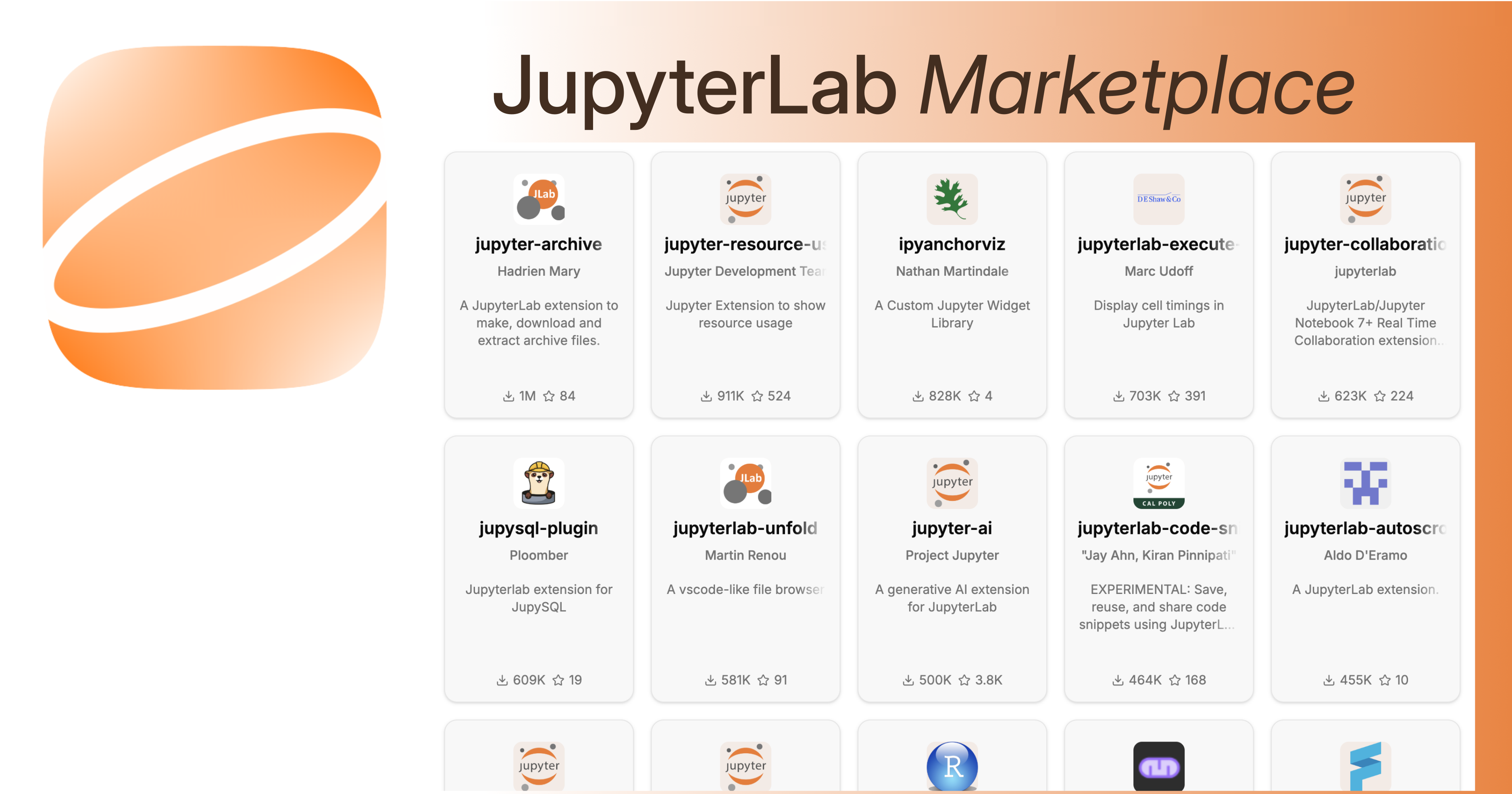
The data behind this post comes from the JupyterLab Extension Marketplace, a community project that tracks all published JupyterLab extensions using PyPI data. The marketplace refreshes automatically and provides download trends, category breakdowns, and discovery tools.
For more on the data and methodology, see our PyData Boston 2025 talk.
What’s Next
- New interaction patterns are still being figured out — chat-based assistance, cell annotations, agent protocols. Probably all of them for different use cases.
- Reproducibility tooling suggests the community is ready for opinionated workflow management built into the notebook experience.
- Cross-notebook-format support (Marimo, Quarto) hints at a future where JupyterLab is the IDE and the notebook format is a choice.
Ensuring extensions keep working as JupyterLab evolves is critical — the team has been discussing extension compatibility testing at recent contributors calls.
For the Marketplace itself, we’re working on:
- Deeper integration with JupyterLab Extension Manager — deep links and “Install in JupyterLab” buttons to go from discovery to installation in one click.
- Expanding Trove classifiers to indicate Jupyter Notebook and JupyterLite support. All three use the same extension system, with important caveats: Notebook extensions need to target different UI elements, and JupyterLite extensions cannot have a server component.
- Better contribution signals — surfacing commits, PRs, and issues to help users gauge how actively maintained an extension is.
At 700 extensions, the community now shapes JupyterLab as much as the core team does. If you’re building extensions, thank you! Every one of them makes Jupyter better for someone.
Jupyter Newsletter
Get detailed extension reviews and updates on the Jupyter ecosystem.
After signing up, Buttondown may send a confirmation email to verify your address.
